Accounting configurations
Enable accounting
When ALIX is connected with the Zoho Books integration, it is possible to enable accounting in the app. To do this, all accounts must be defined.
- In Settings, go to the Accounting section, then Configurations.

- Select the desired account for all accounts.
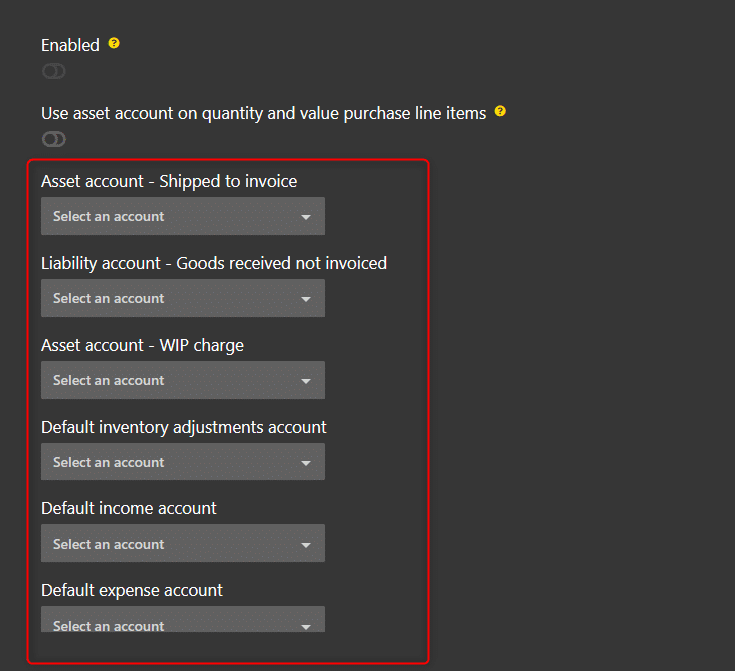
- Once all accounts are set, turn on the Enabled toggle.

Force reporting tag on cards
It is possible to force reporting tags to be added to cards. By enabling this configuration, it is mandatory to add at least one reporting tag to the creation of a card, which ensures that transactions will be properly accounted for.
Note: this configuration also applies when editing sales orders that contain cards of type Sales order.
- In Settings, go to the Settings section, Configurations, and then Project.
- Choose the Force reporting tag on cards configuration.

Force reporting tag on sales orders
It’s possible to force reporting tags to be added to sales orders. By enabling this configuration, it is mandatory to add at least one reporting tag on each line item when creating a sales order, which ensures that transactions will be properly accounted for.
Note: this configuration also applies when editing cards of type Sales order.
- In Settings, go to the Settings section, Configurations, and then Project.
- Choose the Force reporting tag on sales orders configuration.
