General tab
The General tab gathers an item’s basic information: identification, classification, units of measure and compliance data. It is the tab displayed by default when opening an item.
Three toggles — Sold, Manufactured and Purchased — control the display of the Sale, Production and Purchase tabs (see the Main information section).
Main information
This section gathers the item’s basic identification, its type, its units of measure and the toggles that determine its uses.
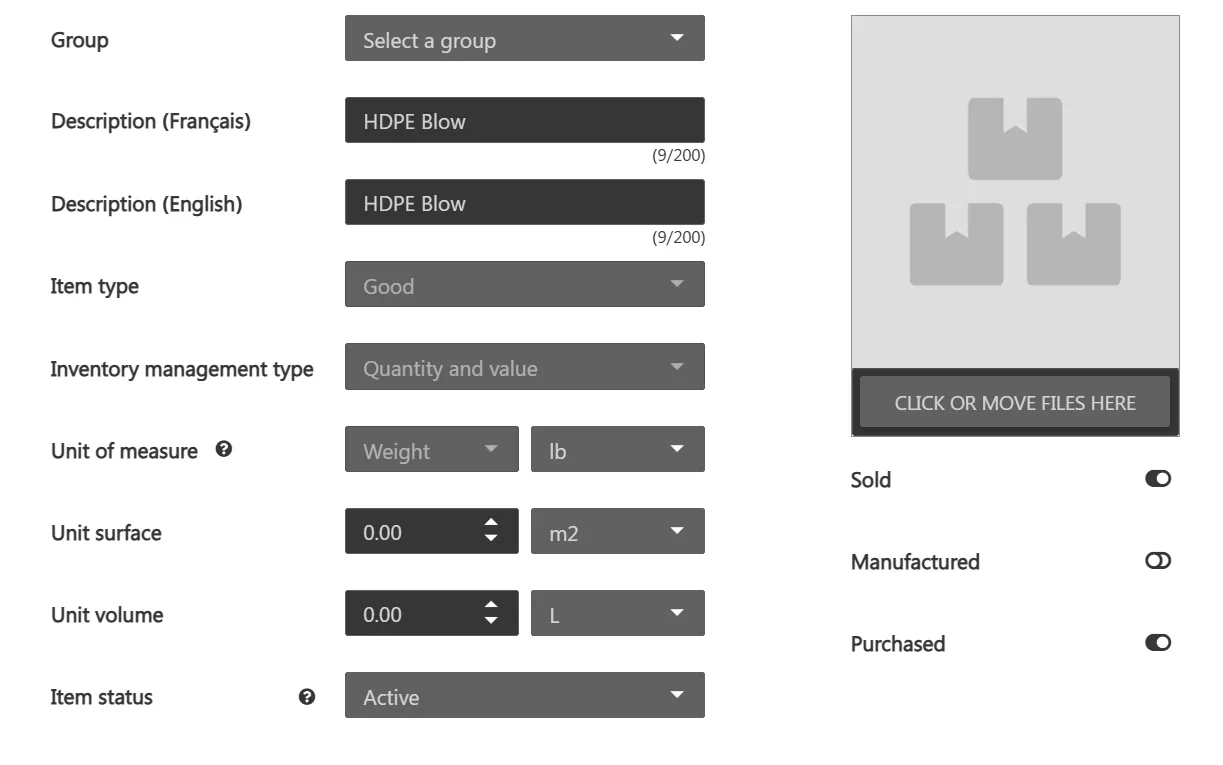
| Field | Description |
|---|---|
| Group | Links the item to an item group. When a group is selected, several fields are defined by the group and locked in the item record. See the Item groups page. |
| Description (French) | Item’s main description (max. 200 characters). Used by default in documents (sales orders, purchase orders) when no specific description is entered there. |
| Description (English) | Item’s description in the secondary language (max. 200 characters). |
| Item type | Nature of the item: Good, Service, Custom service or Tool. The type is chosen when the item is created and cannot be changed afterwards. The Tool type displays the Tool tab (see the Tool tab page). |
| Inventory management type | Determines how stock is tracked: Quantity and value, Quantity only or Not managed. Chosen when the item is created. See the Inventory management page. |
| Unit of measure | The item’s measure type (Standard, Weight, Length, Surface or Volume) and its corresponding unit. |
| Unit weight | Weight of one unit of the item. Used in particular for weight-based purchasing. |
| Unit surface | Surface of one unit of the item. |
| Unit volume | Volume of one unit of the item. |
| Item status | Indicates whether the item is Active or Inactive. An inactive item can no longer be selected on new transactions but remains on existing ones. |
| Item image | Click the image area or drop a file onto it to associate an image with the item (JPG, PNG, GIF or BMP). |
| Sold | Indicates that the item can be sold and displays the Sale tab (see the Sale tab page). |
| Manufactured | Indicates that the item is manufactured and displays the Production tab (see the Production tab page). |
| Purchased | Indicates that the item is purchased and displays the Purchase tab (see the Purchase tab page). |
Note: the Unit weight, Unit surface and Unit volume fields appear depending on the unit of measure. The field matching the selected measure type is not displayed — for example, with a Weight unit of measure, the Unit weight field does not appear.
It is not possible to change the Sold, Manufactured and Purchased toggles if the item is linked to an item group or if it is of the Custom service type.
Codes and attributes
This section contains the item’s identification codes and, for configurable items, its attributes.
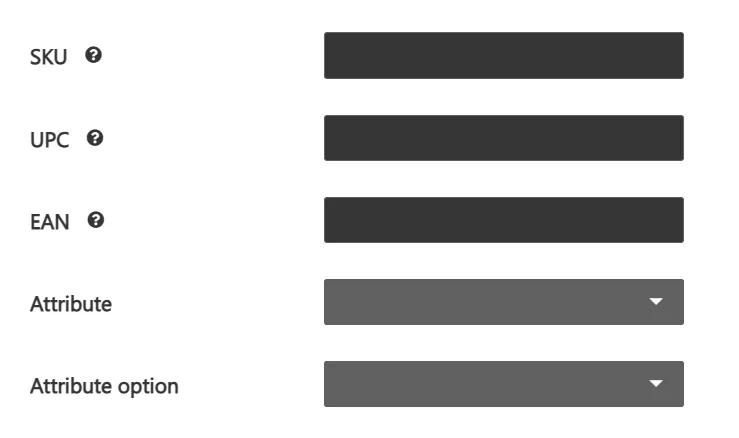
| Field | Description |
|---|---|
| SKU | Item’s unique identification code (stock keeping unit). |
| UPC | Universal Product Code: a unique 12-digit number associated with the bar code. |
| EAN | International Article Number: a unique 13-digit number. |
| Attribute | For a configurable item, the attribute that characterizes its variants. |
| Attribute option | For a configurable item, the attribute option that characterizes the variant. |
Note: for a configurable item, the Create a variant and Sync variants buttons are added to this section. The Attribute and Attribute option are then used to define the variants.
Classification and additional information
This section classifies the item (material, compliance, category) and gathers its reference information.
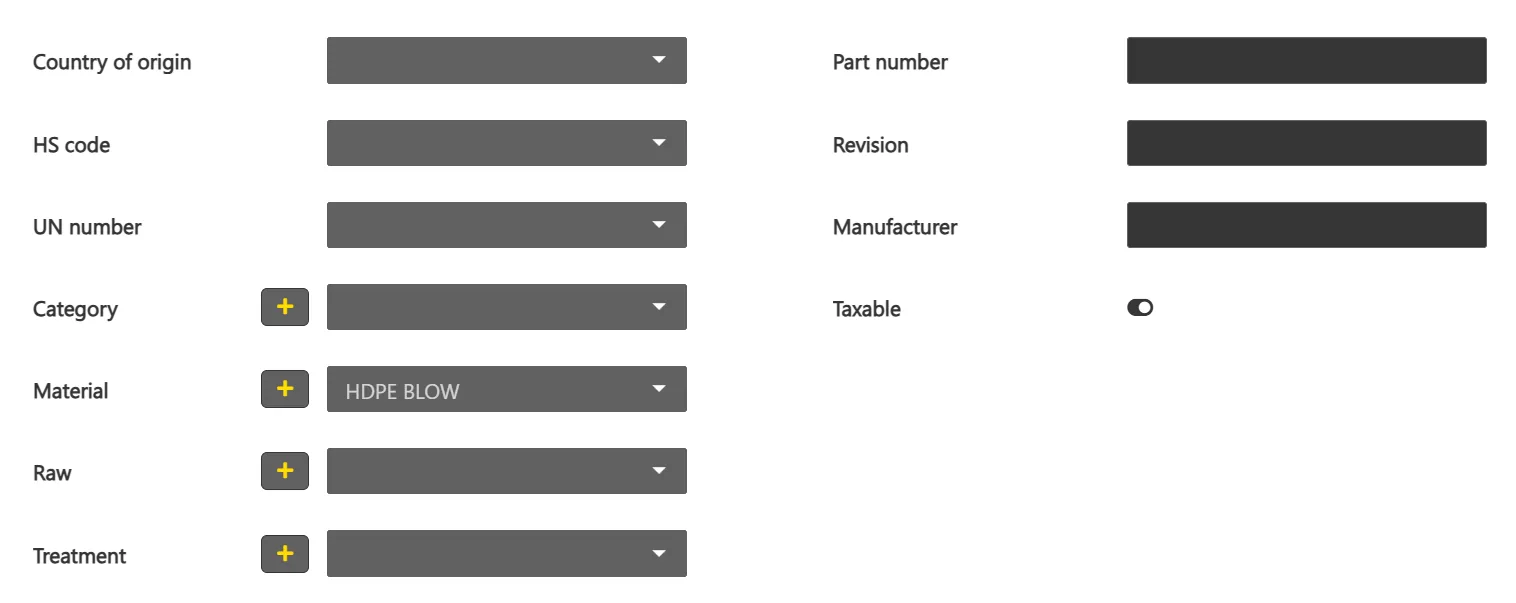
| Field | Description |
|---|---|
| Country of origin | Item’s country of origin. |
| HS code | Harmonized System code, used for customs classification. |
| UN number | UN number used to classify a material as hazardous for transport. See the Hazardous materials management page. |
| Category | Item’s classification category. |
| Material | Item’s material. |
| Raw | Raw associated with the item. |
| Treatment | Treatment applied to the item. |
| Part number | Item’s part number. |
| Revision | Item’s revision. |
| Manufacturer | Item’s manufacturer. |
| Taxable | Indicates whether the item is taxable. |
Note: the Category, Material, Raw and Treatment lists can be enriched with a new value using the + button. The Country of origin, HS code and UN number values are defined in the Settings.
Note: for a configurable item, the Raw part field is added to this section. For a variant (an item created from a configurable item), most of the tab’s fields are inherited from the configurable item and cannot be edited; the Part number remains editable.