

The Tool tab allows you to configure the parameters associated with a Tool type item. These parameters serve as a template when creating tools from this item.
The Tool tab is visible only when the item Type is Tool. This type is selected when creating the item and cannot be changed afterwards.
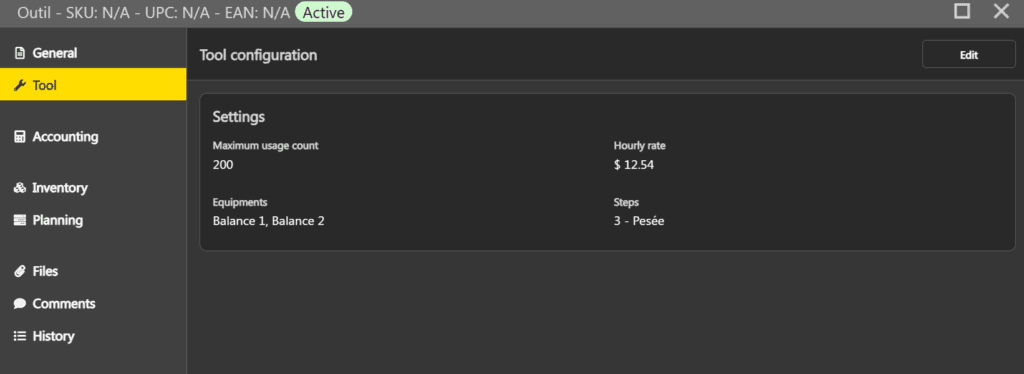
Parameters #
| Maximum usage count | Sets the maintenance warning threshold. When the number of uses of a tool reaches this value, the Remaining uses column in the tools grid displays zero. This threshold is informational and does not prevent the tool from being used. If the field is left empty, no threshold is applied. |
| Hourly rate | Rate used to calculate the tool cost in the production recipe. |
| Equipments | Allows you to associate one or more equipments with this tool item. The equipments selected here are automatically associated with tools created from this item. |
| Steps | Allows you to associate one or more production steps with this tool item. The steps selected here are automatically associated with tools created from this item. |
Click Save in the top right when you are done.
Restrictions #
Tool type items are subject to the following restrictions:
- The inventory management type must be a managed type (Quantity and value or Quantity only). A Tool type item cannot be in Not managed.
- The unit of measure must be Standard.
- The Configurable toggle is disabled. Tool type items do not support variants.
- The Bin option is not available for inventories created from a Tool type item.
Duplication #
When a Tool type item is duplicated, the Tool tab configuration is entirely copied to the new item, including the maximum number of uses, hourly rate, associated equipments, and steps.