

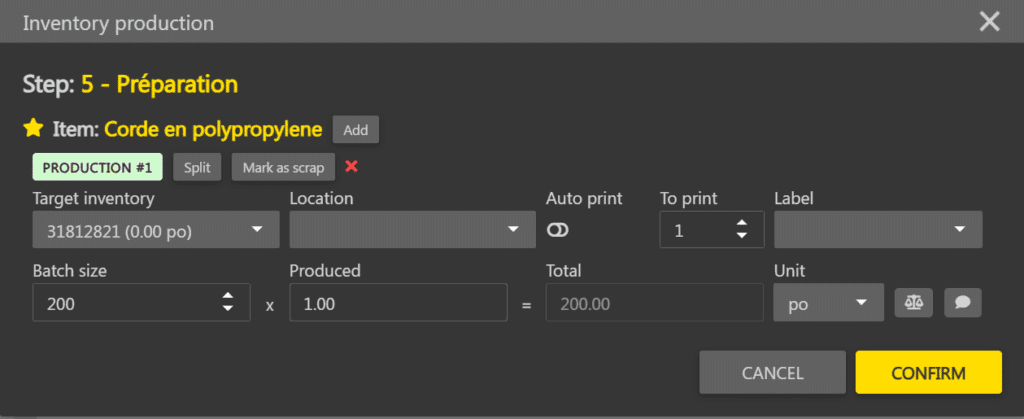
The Inventory production popup allows you to declare produced quantities when moving a card. It also opens in unit mode from a card’s full card.
Open the production popup #
Two methods allow you to open the Inventory production popup:
| Multiple production | Move a card to the next step in the operations board. The popup opens with one line per planned consumption. |
| Unit production | Click on a card to open its full card, go to the Inventory production tab, then click the Unit production button on the desired consumption line. The popup opens with a single line. |
Declare a production #
- Open the Inventory production popup using one of the two methods above.

- Enter the produced measure in the Produced field on the line.
- If necessary, select an existing inventory in the Target inventory selector. By default, Create an inventory is selected.
- Click Confirm at the bottom right when you are done.
Manage production lines #
In multiple production, it is possible to add or split lines to declare multiple inventories from the same consumption.
| Add | Click Add to create a new empty line for the same consumption. The measure can be distributed between lines. |
| Split | Click Split on a line to split it in two. The measure from the original line is distributed between the two resulting lines. |
Note: the total number of lines is limited to 10.
To declare scrap on a line, see the Manage production scrap page.